

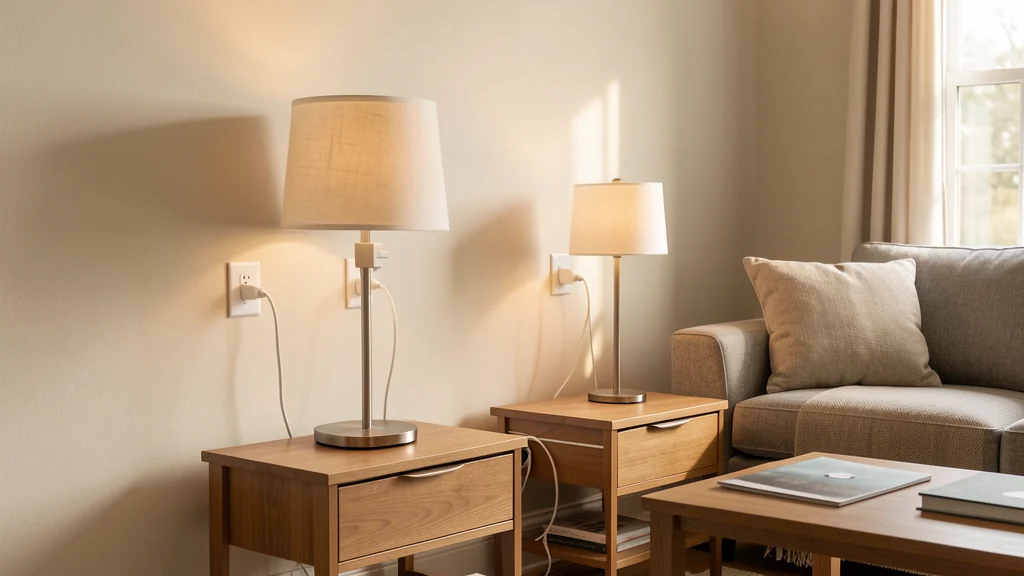
Smart plugs can make a few repetitive household actions easier without turning the entire home into an automation project. A lamp can follow a predictable evening schedule, a fan can stop after a limited period, and a hard-to-reach switch can gain a convenient manual control in an app or on the plug itself. The useful result is not remote control for its own sake. It is a routine that removes one small point of friction while remaining understandable when the network or phone is unavailable.
Using smart plugs for home routines begins with restraint. These devices sit between an outlet and an appliance, so electrical suitability matters more than a clever automation. Start with one or two low-risk, clearly compatible loads, learn how the controls behave, and keep an easy way to turn each device off. Always follow the plug and appliance manuals, ratings, warnings, lease terms, and local requirements. If an outlet is damaged, warm, discolored, loose, or otherwise questionable, stop and ask a qualified electrician to evaluate it rather than using a connected device to work around the problem.
Begin with a small inventory and a specific problem
Walk through the home and list devices that create a minor, repeated inconvenience. Good candidates often have a simple on-off state, modest power needs, a stable location, and no reason to run without ordinary supervision. A table lamp that is difficult to reach is a clearer starting point than an appliance whose heat, motor, cycle, or safety behavior needs active attention. Do not assume that being able to fit a plug into an outlet makes the combination suitable.
For each candidate, write down the actual purpose. “Turn on the living room lamp shortly before sunset” is more useful than “automate lighting.” “Make the fan easy to stop from bed” is more testable than “make the bedroom smart.” A narrow purpose tells you what schedule, controls, and failure behavior are acceptable. It also makes it easier to recognize when a plain timer, accessible power strip, different lamp placement, or repaired wall switch would solve the problem with less complexity.
Prioritize locations where the plug remains visible, dry, ventilated as directed, and easy to remove. Avoid creating a stack of adapters or blocking another receptacle in a way the manufacturer prohibits. If cords already cross a walkway or collect behind furniture, address the physical setup before adding connectivity. The planning approach in a well-designed home drop zone applies here too: put the control where the routine naturally happens instead of expecting people to remember an arbitrary system.
Match the plug, device, and outlet before setup
Read the ratings and restrictions on both the smart plug and the connected equipment. Compare voltage, current, power, grounding, indoor or outdoor use, temperature range, and any appliance categories the instructions exclude. Some loads draw differently when starting than they do during normal operation, and a marketing summary is not a substitute for the complete manual. Never use a smart plug to defeat a safety switch, interlock, thermostat, timer, grounding feature, or required direct connection.
Be especially cautious with portable heaters, cooking equipment, medical equipment, refrigerators, pumps, power tools, large motors, and anything whose unattended operation could cause harm or loss. A connected outlet should not be treated as permission to run equipment unattended. If the plug or appliance documentation does not clearly allow the proposed use, choose another routine or ask the manufacturer or an appropriately qualified professional.
Inspect the plug, cord, and receptacle before connecting anything. Prongs should be intact, the receptacle should hold the plug securely, and the surrounding area should be free of moisture and combustible clutter. Do not conceal a smart plug where heat cannot dissipate as directed. After initial use, check for unusual warmth, odor, noise, intermittent power, or discoloration. Disconnect the setup if anything seems abnormal. You can also check the model in the U.S. Consumer Product Safety Commission recall database and follow any recall instructions that apply.
Set up one device while standing beside it
Install the maker’s current app only from an official app store or documented source, create the account if one is required, and complete setup while you can see the device. Give the plug a plain name based on room and purpose, such as “living room reading lamp,” rather than a joke or ambiguous number. Clear naming prevents the wrong control from being used later, especially when several family members share access or a voice interface is added.
Test three paths before creating an automation: the physical button on the plug, the app control on the local network, and the connected appliance’s own switch. Many simple lamps must be left in their on position for a smart plug to restore power, while electronic devices may remain off after power returns. Confirm actual behavior instead of assuming it. Unplug the smart plug briefly, reconnect it, and observe what happens after power and network service return. The desired recovery state depends on the room and device; document what you see.
If setup requests broad access to contacts, precise location, microphone, or other unrelated information, pause and review why. Some permissions may support a feature, but you do not have to enable every optional integration. Configure only the functions needed for the routine, and review app privacy settings after setup rather than accepting defaults indefinitely.
Choose a control pattern that fits the routine
Different control patterns solve different problems. A schedule is useful for a stable event. A countdown timer limits a session. A manual shortcut improves reach. A sensor-triggered action can respond to conditions, but it adds another device and more possible failure points. Start with the least complicated pattern that meets the purpose, then observe it for a week before adding conditions or voice control.
| Routine need | Simple starting control | Review question |
|---|---|---|
| Predictable evening lamp | Fixed on and off schedule | Does it still fit changing daylight and bedtime? |
| Limited fan session | Manual start with a countdown | Can anyone stop it immediately at the plug? |
| Hard-to-reach switch | App shortcut plus physical button | Is there a usable fallback without the phone? |
| Occasional vacation pattern | Temporary schedule with an end date | Was the temporary rule removed after returning? |
Avoid very long chains such as “if a sensor detects motion after sunset while a phone is away, turn on a plug unless another scene is active.” Each condition may be reasonable alone, but the chain becomes hard to diagnose. If the routine needs several exceptions, it may be better as a conscious manual action. Simplicity is a reliability feature because household members can predict and correct it.
Build schedules around real transitions
Anchor automation to moments that already exist: arriving home, starting an evening reading period, or ending a work session. Set conservative on and off times, then watch what happens over several ordinary days. Ask whether the device activates too early, remains on after the room is empty, or surprises someone who expected it to stay off. Adjust one variable at a time so you know what improved the result.
Sunrise and sunset rules can be useful, but verify the home’s location and time zone and consider how seasonal changes affect the routine. A clock schedule is often easier to understand. Whatever method you choose, include an obvious off action. The physical button should remain accessible, and people should know that turning off the appliance’s own switch may prevent a later smart-plug command from producing visible light or airflow.
Temporary changes need explicit endings. Guests, vacations, school breaks, and daylight-saving transitions can make an old rule inconvenient. Use a calendar reminder to review temporary schedules. If the app allows several household members to edit routines, agree on who owns each one. Otherwise, two well-intended people may create overlapping schedules that make the plug appear unreliable.
Design for people who will not use the app
A home system is not simple if only its installer knows how it works. Show household members the physical button, explain which device it controls, and describe what happens after a power or internet interruption. If a guest, child, caregiver, or roommate might encounter the setup, keep the ordinary appliance control usable where practical. Do not make urgent access depend on remembering a voice phrase or unlocking someone else’s phone.
Use consistent names and avoid grouping unrelated devices under vague labels such as “everything.” A command that shuts down several plugs can have unintended effects when one device is still needed. Place a small non-electronic note in a household guide if necessary, but do not put adhesive labels over ventilation openings, ratings, indicators, or controls. The goal is a predictable environment, not an invisible one.
Accessibility needs vary. A smart plug may reduce bending or reaching for one person, while a tiny button, visual-only status light, or complicated app creates a new barrier for another. Test the complete interaction with the person who will rely on it. Keep controls reachable and consider whether tactile, voice, phone, or physical-switch access works during a network outage.
Secure the account and limit data exposure
A smart plug can reveal small pieces of household behavior, such as when a routine runs or when someone uses the app. Protect the account with a unique password and enable multifactor authentication if the provider offers it. Do not reuse the household Wi-Fi password as the app password. Share access through the provider’s household or guest features instead of sending one credential to everyone.
Keep the plug, app, phone, router, and any connected hub updated. Enable automatic security updates when the setting is appropriate and supported, and retire products that can no longer receive necessary fixes. Review linked voice assistants, third-party services, and remote-access permissions; remove integrations the routine does not need. Delete old household members and unused devices from the account.
Secure the network as well as the plug. The Federal Trade Commission’s guidance on securing a home Wi-Fi network covers measures such as changing default administrative credentials, using current encryption, and keeping router software updated. If your router supports a separate guest or device network and the plug works correctly there, separation can limit unnecessary access to personal computers and storage. Follow the router and device documentation because network isolation features differ.
Troubleshoot from the physical layer outward
When a command fails, do not immediately reset everything. First confirm that the outlet works, the smart plug is fully seated, the appliance’s own switch is in the expected position, and the plug’s physical control responds. Next check whether the phone and plug have network access, whether the app reports an outage, and whether the correct household, room, and device are selected. This sequence preserves evidence and often finds a simple cause.
If only a schedule fails, review its enabled status, days, time zone, sunset location, conditions, and competing routines. Check whether another person changed it. If the device repeatedly disconnects, consider distance and interference before moving network equipment randomly. A broader guide to a basic home toolkit can help you organize safe visual checks, but do not open or repair a smart plug yourself.
Use a factory reset only after saving needed settings and reading the official reset procedure. A reset removes configuration but does not fix a damaged outlet, unsuitable load, failing appliance, or unsupported network. If there is overheating, arcing, smoke, burning odor, melted material, or repeated breaker operation, disconnect power only if it is safe to do so and seek qualified help. Do not keep testing a suspect electrical combination.
Review each routine instead of letting it become invisible
Monthly, glance at the device list and active automations. Remove duplicates, rename unclear entries, install updates, and confirm that temporary access and schedules are gone. Inspect the plug and outlet, and keep the area unobstructed as the manuals direct.
Frequently asked questions
Can any appliance be connected to a smart plug?
No. Physical fit does not establish electrical or operational compatibility. Check the ratings, environment, load type, warnings, and allowed uses in both manuals. Avoid devices whose safe operation depends on supervision, built-in controls, special wiring, or uninterrupted power unless the manufacturers explicitly support the arrangement and qualified guidance confirms it where needed.
Will a smart plug work when the internet is down?
It depends on the product and control method. The physical button may continue to work, and some schedules or local controls may operate without internet, while remote commands and cloud-based routines may not. Test the behavior safely before depending on it and maintain a manual fallback.
Should a smart plug turn back on after a power outage?
There is no universally correct state. Automatic return may be convenient for a lamp but undesirable for another device. Check whether the product offers a power-recovery setting, choose the most conservative state for the use, and test what both the plug and appliance actually do.
Do smart plugs save energy automatically?
Not necessarily. A schedule can reduce unnecessary runtime for a suitable device, but the plug also consumes some power and cannot correct every habit. Use any energy estimate as a comparison signal rather than a precise utility measurement unless the documentation establishes its accuracy for that purpose.
How many smart-plug routines should I create at first?
Start with one routine on one plug. Observe it through normal days, weekends, outages, and schedule changes before expanding. A small successful system is more useful than a large set of rules that household members cannot explain or override.