

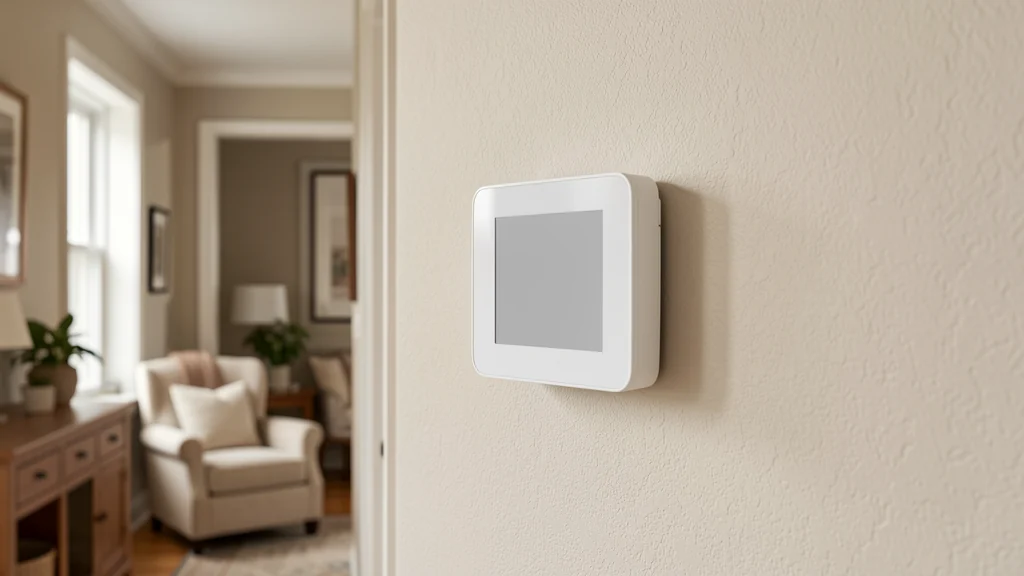
A smart thermostat earns its place in a home not because it is connected to an app, but because it can hold comfort steady while quietly adjusting for the moments nobody is watching. The device itself does very little on its own. The schedule, the sensors, and the small corrections you make over the first few weeks are what decide whether the home feels right or whether everyone keeps reaching for a manual override.
Getting comfortable with a smart thermostat is less about learning every feature and more about matching its settings to how your household actually moves through a day. This guide walks through building that match: a comfort baseline, a schedule with sensible setbacks, occupancy and sensor use, humidity, recovery time, gradual tuning, exceptions, privacy and security, and basic troubleshooting. Always follow your unit’s manual and any guidance from a qualified professional for wiring, system compatibility, or HVAC-specific settings; this guide focuses on everyday use once the thermostat is already installed and operating.
Set a comfort baseline before you automate anything
Before creating schedules or trusting automatic adjustments, spend a few days simply noticing how your home feels at different times. Comfort is not only a temperature number; it includes airflow, sunlight through windows, humidity, and how many people and appliances are active in a room. Two households at the same reading on the display can feel completely different.
Write down the settings that felt comfortable during ordinary activities: cooking, sleeping, working from a home office, or relaxing in the evening. This short log becomes your starting reference. Resist the urge to copy a number you saw suggested somewhere else, since insulation, window exposure, local climate, and personal preference vary too much for one figure to fit every home.
Notice how comfort varies room to room
A single thermostat usually reads the temperature near its own location, which may not match a bedroom down the hall or a sunroom with more window exposure. If one area consistently feels off compared to the thermostat’s reading, that gap is useful information for the sections on sensors and exceptions below.
Build a schedule around real routines, not a generic template
Most smart thermostats arrive with a default schedule built around a typical workday, and it rarely matches how a specific household actually lives. Before accepting the default, map out when people are usually home, asleep, away, or active in the kind of way that changes comfort needs, such as exercising or cooking. Build the schedule from that map rather than adjusting a template to fit around it.
Keep the number of scheduled periods small at first. Two or three transitions a day are easier to evaluate and adjust than eight narrow blocks that barely differ from each other. You can always add more precision once you understand how the home responds to the simpler version.
Use setbacks that match how long a period actually lasts
A setback is a deliberate, temporary change away from your comfort baseline, usually to reduce system demand while nobody needs peak comfort, such as during work hours or overnight. Setbacks work best for longer, predictable gaps. A short setback before a quick errand may produce only a small reduction in heating or cooling demand and may delay the return to comfort, while a setback during a full workday or a full night’s sleep has more time to matter. Actual results depend on the equipment, climate, humidity needs, control strategy, and household schedule. The ENERGY STAR smart thermostat guidance is a useful starting point, but equipment-specific instructions remain controlling. Match the setback size to the length of the gap, and note how long the system takes to return to baseline, a recovery period covered later in this guide.
| Typical daily period | Common household pattern | What to watch for |
|---|---|---|
| Early morning | People waking, getting ready, sometimes cooking | Whether the system reaches comfort before the household needs it |
| Workday or school hours | Home mostly or fully unoccupied | Whether a deeper setback still allows a reasonable recovery time |
| Evening | Cooking, gathering, more activity and body heat | Whether the comfort baseline still applies once more people and appliances are active |
| Overnight | Sleeping, lower activity, doors and vents often closed | Whether bedroom comfort differs from the thermostat’s own reading |
| Irregular days | Weekends, holidays, remote work, illness | Whether the default schedule still fits or needs a temporary override |
Use this breakdown as a starting structure, not a fixed rule; households with rotating shifts, small children, or frequent travel will need their own irregular rhythm instead of a standard weekday pattern.
Let occupancy sensing help without overcorrecting
Many smart thermostats include some form of occupancy or motion sensing meant to detect whether anyone is nearby and adjust accordingly. This can smooth over the gaps a fixed schedule misses, such as an unplanned day at home or an early return from work. Treat it as a helpful signal layered on top of your schedule, not a full replacement for one, since occupancy sensing can be fooled by pets, low-traffic hallways, or people sitting quietly.
If you notice the system swinging between settings more often than feels comfortable, check whether occupancy sensitivity can be adjusted or whether it makes more sense to rely on the schedule alone during especially quiet or especially busy stretches. A setting that reacts to every brief absence can create more temperature swings than a steady, well-built schedule would.
Treat humidity as part of comfort, not an afterthought
Temperature and humidity work together to create the sensation of comfort. A room can register an acceptable temperature and still feel sticky, stuffy, or unexpectedly chilly because of how much moisture is in the air. If your thermostat or a connected sensor reports humidity, watch how it shifts with the seasons, with cooking and bathing, and with how often windows are opened.
Persistent humidity problems, whether too damp or too dry, are usually a sign to look at ventilation and household habits rather than to push the temperature setting further in one direction. For habits that support better indoor air quality alongside comfort, see this guide to improving indoor air quality with everyday habits. If humidity swings seem tied to your heating or cooling equipment itself, that is a question for your system’s manual or a qualified professional rather than a thermostat setting.
Get more value from additional sensors
Some smart thermostat systems support extra temperature or occupancy sensors placed in other rooms, which can average or prioritize readings from more than one location. These are most useful when the thermostat’s own location does not represent the space where comfort matters most, such as a primary bedroom far from the main hallway.
Place additional sensors away from direct sunlight, drafts, vents, and heat-generating appliances, since any of those can produce a reading that does not reflect the room’s real comfort. Confirm placement and setup against your system’s manual, since supported sensor types vary by manufacturer.
Plan for recovery time instead of chasing a set point
Recovery time is how long a system needs to bring a space back to your comfort baseline after a setback, and it depends on outdoor conditions, insulation, and the specific equipment involved. A common mistake is expecting an instant return to comfort right when a scheduled period ends, then repeatedly adjusting the setting when the room has not caught up yet.
Some smart thermostats offer a feature that starts recovery earlier so the target temperature is reached by the scheduled time rather than starting at it. If your system offers something similar, review how it is documented in your manual and test it over a few cycles before assuming it behaves a certain way. If recovery consistently takes far longer than expected, raise the pattern with a qualified HVAC professional, since it may point beyond what a schedule adjustment can fix.
Tune settings gradually and track what changes
Once a baseline schedule is running, resist the temptation to rework everything at once. Change one variable at a time, such as a single setback depth or a single transition time, and give it several days before judging the result. If multiple settings change together, it becomes difficult to tell which adjustment actually helped.
Keep a simple ongoing note of what you changed and how the household reacted. Preferences shift with the seasons, so a setting that felt right in one stretch of weather may need revisiting later. Treat tuning as an ongoing light habit rather than a one-time setup task you complete and forget.
Prepare for exceptions: travel, guests, illness, and extreme weather
A schedule built for typical days will occasionally meet an atypical one. Decide in advance how you want to handle travel, guests staying over, illness that keeps someone home and sedentary, or unusually extreme outdoor temperatures. Many systems support a temporary hold or vacation setting that overrides the normal schedule without erasing it, which is usually more convenient than deleting and rebuilding your regular plan.
Seasonal transitions deserve particular attention, since a schedule tuned for one season may need adjustment as conditions change outside. For a broader look at getting a home ready as seasons shift, see this guide to preparing your home for seasonal changes. Confirm any extreme-weather guidance, such as how a system should behave during very high or very low outdoor temperatures, against your equipment’s own manual rather than a general assumption.
Protect privacy and security on a connected thermostat
A smart thermostat is a connected device, and treating it that way protects both your data and your home network. Use a unique, strong password for the thermostat’s account and for the home network it connects to, and enable multi-factor authentication if the manufacturer’s app supports it. Avoid reusing a password from another account.
Review what data the thermostat collects and shares, and adjust any optional sharing settings to a minimum. Keep the thermostat’s firmware and companion app updated, since updates often address security issues as well as features. If your router supports separate networks for smart home devices, placing the thermostat on a network apart from computers and phones can limit what a compromised device reaches. Consult your product’s documentation for exact steps, since menus differ across manufacturers.
Common smart thermostat mistakes
Copying someone else’s ideal number
A setting that feels right in another home may not translate to yours because of differences in insulation, sun exposure, and personal preference. Build your baseline from your own observations rather than a number recommended online.
Setting an aggressive setback for a short absence
A deep setback right before a quick outing may produce only a small energy reduction while delaying the return to comfort. Match setback depth to the equipment, conditions, and how long the gap actually lasts.
Overriding the schedule every day
Frequent manual overrides usually mean the schedule does not match real routines. Treat repeated overrides as a signal to rebuild the schedule rather than a permanent workaround.
Ignoring humidity and airflow
Chasing a temperature number while ignoring humidity or stagnant airflow can leave a room feeling uncomfortable even at a reading that should feel fine. Address ventilation and humidity alongside the temperature setting.
Skipping the manual for system-specific settings
Compatibility details, wiring, and advanced equipment settings vary widely between systems. Skipping the manufacturer’s manual, or a qualified professional’s input, in favor of general assumptions is one of the most common sources of persistent problems.
Troubleshoot common thermostat problems
If the display seems unresponsive or disconnected from the app, check its power or battery status and confirm the home network is working before assuming the device has failed. A brief restart, following the manufacturer’s instructions, resolves many glitches.
If a room consistently runs warmer or cooler than the thermostat’s reading, revisit the sections above on comfort baseline and additional sensors before assuming the equipment itself is at fault. If the system runs constantly without reaching the target, or cycles on and off unusually often, consult your manual’s troubleshooting section and contact a qualified HVAC professional if the pattern continues.
If a schedule stops behaving as expected after an app or firmware update, check the manufacturer’s release notes, since updates occasionally reset preferences. Keeping your own written record of preferred settings, built during the tuning process described earlier, makes it much faster to restore a schedule after an unexpected reset.
Frequently asked questions
What temperature should I set a smart thermostat to?
There is no single correct number. Build a baseline from what feels comfortable in your own home during ordinary activities, and let that observation guide your schedule rather than a figure suggested elsewhere.
Do I need extra sensors to use a smart thermostat well?
Not necessarily. Extra sensors help most when the thermostat’s own location does not represent the room where comfort matters most. Many households get good results from a well-built schedule alone.
How long should a setback period last to be worthwhile?
It depends on the home, equipment, weather, humidity needs, and control strategy. Longer predictable gaps often create a clearer opportunity, while a short errand may produce only a small reduction and a noticeable comfort delay.
Is it normal to adjust settings often after installation?
Yes. Gradual tuning over the first several weeks is a normal part of matching a smart thermostat to a specific household. Frequent adjustments early on are expected; frequent manual overrides months later usually mean the schedule needs rebuilding.
What should I do if I’m not sure my thermostat is compatible with my heating or cooling system?
Check the manufacturer’s compatibility documentation and your system’s own manual, and consult a qualified HVAC professional for wiring or system-specific questions rather than guessing.
Final takeaway
A smart thermostat only sacrifices comfort when it runs on a schedule that does not match the household using it. Start from an honest comfort baseline, build a schedule around real routines with setbacks sized to real gaps, let occupancy sensing and extra sensors support that plan instead of replacing it, and account for humidity and recovery time along the way. Tune gradually, plan for exceptions, protect the device like the connected system it is, and lean on your manual or a qualified professional whenever a setting touches wiring or equipment compatibility. The result is a system that quietly holds comfort steady instead of one that needs constant correction.