

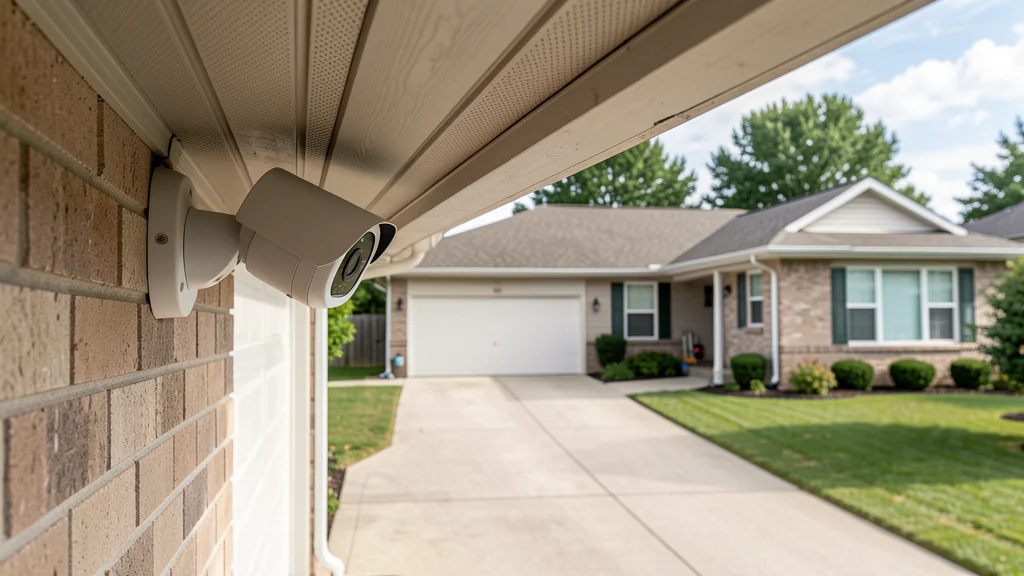
Good security camera placement begins with a narrow question: what specific event does the household need to see? A camera meant to confirm a package arrived needs a different view from one used to check whether a gate was left open. Defining that task helps keep the lens on the household’s own entrance, path, driveway, garage, or other relevant area instead of collecting a broad record of neighbors and passersby.
A camera does not guarantee safety, prevent every incident, or replace locks, lighting, alarms, attentive routines, or emergency services. It can also create privacy and account risks of its own. Features, storage, and viewing angles differ, and laws governing video, audio, notice, shared property, and workplaces vary by location. Review the exact manual and privacy terms, then check applicable laws, lease terms, homeowners’ association rules, and building policies. Seek local legal or qualified installation advice when the situation is unclear.
Map the job before choosing a mounting point
Walk the property in daylight with a simple plan of the home or a few reference photographs. Mark the area the household controls, the boundary with neighboring property, shared paths or hallways, doors and windows, likely approach routes, exterior lights, and places where landscaping changes across the year. For each proposed camera, write a one-sentence purpose such as “show whether someone is standing at the side gate.” If the purpose is vague, the view will probably be too broad.
Stand where the camera might go and use a phone camera only as a temporary visual aid, not as proof of the final field of view. Ask what appears at the edges: a neighbor’s bedroom window, another apartment’s doorway, a fenced yard, a public sidewalk, or an interior room through glass. Move lower, angle downward, choose a narrower lens, or use a physical or software privacy mask where supported. The goal is not the largest possible picture; it is enough detail within the intended area.
Consider whether a non-camera change solves the problem with less collection. Better path lighting, trimming vegetation without removing privacy screening, repairing a gate latch, moving deliveries to a sheltered location, or organizing an entry may address the actual concern. A practical home drop zone can help residents manage keys and deliveries inside without adding another recording device.
Separate useful areas from private ones
Outdoor views should stay primarily on the home’s own property and immediate access points. A small unavoidable strip of sidewalk or street may appear in some layouts, but that is not a reason to monitor a whole block. Avoid aiming along the street when aiming down at the walk or driveway will do. Do not use zoom or tracking to follow activity beyond the stated purpose.
Neighbor privacy deserves an explicit check, not a casual assumption. Talk with an affected neighbor when a lens is visible from their home or a shared boundary makes the view uncertain. Show the proposed angle without revealing account access. Adjust the mount so it does not face their doors, windows, balcony, pool, fenced recreation area, or yard. Recheck after foliage drops, a fence changes, or the camera is bumped.
Indoor cameras need an even higher threshold. Do not place them in bathrooms, bedrooms used by others, changing areas, or any space where a resident, guest, caregiver, tenant, or worker reasonably expects privacy. A camera in a child’s room, elder-care space, guest room, or live-in worker’s area raises sensitive consent and access issues that generic household advice cannot resolve. Prefer a less intrusive sensor or a limited common-area view when it can meet the need.
Remember reflections and open doors. A lens aimed at an exterior porch may capture a private interior in glass after dark. A hallway view can become a bedroom view when a door opens. Test realistic conditions and use fixed framing, privacy masks, or relocation rather than depending on everyone to keep curtains and doors in one position.
Match placement to the specific task
| Task area | Privacy-minded approach | Common problem to avoid |
|---|---|---|
| Front entrance | Aim down at the doorstep and immediate approach | Including neighboring doors, windows, or a wide sidewalk |
| Driveway or parking space | Frame the household’s vehicles and property boundary | Watching another home’s parking area or public travel lane |
| Side or back gate | Use a narrow fixed view of the latch and owned path | Looking over a fence into an adjacent yard |
| Garage interior | Frame access doors and the household’s stored property | Capturing a shared corridor or unrelated living space |
| Indoor common area | Use only with informed household agreement and limited access | Recording private conversations or rooms beyond the purpose |
Mounting height is a compromise, not a universal number. A very high camera may show the top of a person’s head while exposing more surrounding property. A low camera may be easier to obstruct or reach. Use the manufacturer’s supported range and a location that captures the needed event without inviting a broad horizon. Make sure eaves, downspouts, screens, lights, and moving branches do not block the view or create constant motion.
Backlighting can erase useful detail. A camera pointed from a dark porch toward bright sky may produce silhouettes, while an infrared light can reflect from nearby siding, glass, or spider webs. Test daytime, dusk, nighttime, porch-light, and vehicle-headlight conditions. Add or reposition ordinary lighting where lawful and appropriate rather than expanding the camera view to compensate for a poor image.
Treat audio as a separate decision
A microphone can capture conversations well outside the useful video area, including speech through open windows or across property lines. Audio recording and consent rules may be more restrictive than video rules and can vary by state and setting. Do not assume a visible camera provides adequate notice or consent for sound. If the purpose does not require recorded audio, disable it and verify the setting after updates or resets.
Two-way talk may be useful without storing every nearby conversation, depending on the product’s controls. Review whether activating talk also records audio, which users can initiate it, and whether clips are retained. In a shared building, workplace, rental, or household employing in-home workers, obtain guidance appropriate to the local relationship and rules rather than treating the camera as a purely personal device.
Reduce motion collection at the source
Use activity zones to cover the doorway, gate opening, or owned parking area while excluding sidewalks, roads, trees, and adjacent property. Set detection distance and sensitivity only high enough for the task. Broad zones create repeated alerts, unnecessary clips, and notification fatigue; eventually people may ignore the event they actually care about.
Schedules can reduce collection in areas used differently throughout the day. For example, a backyard camera intended to check a closed gate may not need to record while the family is using the yard. A common-area indoor camera may be physically unplugged or shuttered when residents are home, if that method fits the purpose and device. Make the camera’s active state visible and understandable rather than hiding it from people who share the space.
Keep the shortest useful recordings
Retention should begin with a question: how long would it realistically take the household to notice and review the event this camera serves? Choose the shortest available period that answers that need. Keeping every clip for weeks or months “just in case” increases the record of household schedules, visitors, workers, neighbors, and children without making each clip more useful.
Review whether storage is local, cloud-based, or both; whether deleting a clip removes copies from all locations; what happens when a subscription ends; and whether shared or downloaded clips remain elsewhere. Limit continuous recording when event recording is sufficient. If a clip must be preserved for a legitimate incident, export only what is necessary, store it securely, document who has a copy, and delete routine footage on schedule.
Secure the account and every viewer
The owner account controls a live or recorded view of the home. Give it a unique password, protect its connected email account, and enable multifactor authentication when available. The Federal Trade Commission’s consumer guidance on how to secure home security cameras also recommends strong account practices, encryption settings, and software updates. Use official apps and update cameras, hubs, routers, and viewing devices through supported methods.
Create individual accounts or roles rather than sharing the owner’s credentials. A resident who needs live view may not need permission to add cameras, change retention, download clips, or invite other people. Remove former residents, guests, installers, caregivers, and service providers as soon as their access ends. Review signed-in devices and account alerts, and investigate changes the household did not initiate.
Disable remote viewing if the household only needs local access and the product supports that choice. Disconnect integrations that do not serve the written purpose. If practical and supported by the router and camera, place connected devices on a separated network that cannot freely reach personal computers. Network separation supplements updates and account controls; it does not make an exposed camera harmless.
Check rules before drilling or recording
Renters should obtain required permission before attaching a camera, running cable, or changing a shared entrance. Condominium, co-op, and homeowners’ association rules may restrict exterior changes even when the resident owns the unit. Shared hallways, lobbies, elevators, laundry areas, and parking structures are not simply extensions of a private living room. Building management may control placement, notice, footage access, and retention.
Check local and state requirements concerning video surveillance, audio consent, notices, workers, tenants, children, and views beyond the property. Rules can change and facts matter, so a sign or app setting is not a universal solution. If recording could include a tenant’s home, a neighbor’s private space, an employee, or a sensitive shared area, obtain qualified local advice before proceeding.
Follow the manufacturer’s mounting, weather, electrical, and cable guidance. Use a qualified installer or electrician when the camera requires unfamiliar wiring, work at height, penetration of weather barriers, or changes near electrical equipment. Keep ladders and drilling away from hidden utilities. Permission and safe installation are prerequisites, not details to settle after the camera is active.
Run a privacy acceptance test
Before enabling routine recording, have a household member walk the intended route during day and night. Review live view, clips, audio status, motion boundaries, lighting, and notifications. Look carefully at every edge of the frame and at reflections. Confirm that privacy masks remain fixed when zoom, pan, tilt, or tracking features operate. If the device can move, set limits or choose a fixed camera for a fixed task.
Ask a second person to review the view because the installer may focus on image quality and overlook what belongs to someone else. Verify that each user sees only the cameras and controls they need. Test the indicator, shutter, or power routine used for indoor privacy. Record the approved angle with a reference screenshot stored privately so later drift is easier to spot.
Review placement as the home changes
Inspect exterior mounts after severe weather and during a seasonal home review. Clean the lens as directed, remove webs, check seals and cable condition, and confirm the mount remains firm. Then reassess the view: leaf loss, new landscaping, construction, parked vehicles, fencing, or a neighbor’s renovation can turn an acceptable angle into an intrusive one.
At least a few times a year, review every camera’s purpose, users, integrations, audio state, detection zones, and retention. Delete obsolete downloads and remove a camera that no longer has a specific job. Revisit the arrangement whenever residents, caregivers, tenants, workers, or neighbors change, because consent and expectations can change even when the hardware stays still.
Frequently asked questions
Should a camera point at the street?
Usually, a downward or narrower view of the household’s own approach is more useful and less intrusive. Some background public area may be unavoidable, but minimize it. Check local rules and avoid tracking people or vehicles beyond the camera’s defined task.
Can a home camera include a neighbor’s yard?
It should not be intentionally aimed into a neighboring yard, window, doorway, balcony, or other private area. Reposition the mount, narrow the view, or use a reliable privacy mask. Discuss boundary concerns and obtain local advice when property layouts or rules are unclear.
Where should indoor cameras never go?
Avoid bathrooms, changing spaces, bedrooms used by others, and any place where someone reasonably expects privacy. Sensitive care, rental, guest, and worker situations need informed agreement and may require legal guidance. A non-camera sensor is often more appropriate.
How long should recordings be kept?
Use the shortest available retention period that supports the documented purpose. There is no single interval for every household. Consider how quickly an event would be noticed, legal or contractual obligations, storage location, deletion behavior, and the privacy cost of a longer history.
Is multifactor authentication necessary for a camera account?
Enable it when offered. A camera account can expose live views, recordings, household patterns, and administrative controls. Multifactor authentication, a unique password, protected email, updates, and limited user access work together; no single control guarantees protection.
The most responsible camera is not the one that sees the farthest. It is the one with a clear task, a controlled view, informed household rules, minimal recording, short retention, and secure access. If those boundaries cannot be established, choosing not to install that camera is a practical privacy decision.